
Choose real estate marketing software by checking whether it can turn one listing into a complete, accurate marketing pack—not just a single post. For each property, confirm the source details, required formats, branding, factual accuracy, and final publishing tasks. Use the checklist below to prepare your first listing and separate content creation from the work you still need to review yourself.
- Real estate marketing software should match your listing workflow, not just produce an attractive post.
- Propertylaunch suits solo agents who want a branded marketing pack from one pasted listing link.
- Review property facts, photos, branding, captions, and contact details before publishing.
- Choose between manual design, listing software, and hired help by comparing the work you retain.
What should you check in real estate marketing software?
Check the whole listing workflow: source material, output formats, factual review, and publishing responsibilities. A finished Instagram image does not cover the flyer, email, video, and copy you might need for the same property.
Start with the work you want to stop repeating. Then compare approaches against that task list, rather than choosing whichever demonstration looks most polished.
| Approach | Best for | Work it covers | Work you retain | Main trade-off |
|---|---|---|---|---|
| Manual design and self-written copy | Agents who want direct control over each asset | You assemble the design and write the text | Preparing each format and checking every version | Control comes with hands-on production |
| Propertylaunch | Solo agents who want a listing-link starting point | Creates branded posts, Stories, flyers, captions, emails, and videos from a pasted listing link | Checking accuracy, suitability, and final publishing tasks | Fast generation does not replace an agent's review |
| Hired marketing help | Agents who want to delegate production | The deliverables agreed in the brief | Supplying facts, approving work, and confirming responsibilities | The scope must specify formats, revisions, and publishing |
Propertylaunch is best for solo real estate agents who want one listing link to create a branded marketing pack. Its stated creation time is about 60 seconds; that is generation time, not a promise that your entire launch is finished.
Why this matters
A listing launch contains repeated decisions. Which image leads? Which property details belong in the caption? Does the flyer show the correct contact information? Is the email describing the same property as the social post?
For your 2026 listing workflow, the useful distinction is between creating assets and approving assets. Software can handle the first task while you remain responsible for the second. Make that boundary explicit before you depend on a new workflow.
Your listing-by-listing checklist
Use this sequence for your next property. Keep the review specific to the listing instead of treating an earlier approval as permission to publish every future output.
Prepare the source
Start with the property listing you intend to market. Read it before using it as the source for generated content; a convenient link is not a substitute for checking what the page actually says.
Confirm the address, property description, room details, listed features, and current status against your approved information. Remove stale wording from your working notes. If the listing page and your instructions disagree, settle the discrepancy before creating the marketing pack.
Your checkpoint is simple: the source should describe the property you are authorized to promote, as it stands now.
Choose the formats
Write down what this listing needs before generating anything. A property launch might need an Instagram post, a Story, a flyer, an email, and a video; another task might need only an updated caption and flyer.
The supplied product description lists 6 output types: Instagram posts, Stories, flyers, captions, emails, and videos. Treat those as different deliverables, not interchangeable versions of the same message.
Choose the formats you will actually use. Generating an asset does not create a reason to publish it, and an unused format should not distract you from checking the material buyers will see.
Create the pack
Paste the property listing link into the listing-marketing tool. Propertylaunch turns that link into a branded marketing pack in about 1 minute, rather than asking you to start with a blank design for each output.
Keep your approved property details nearby while you review the result. Do not interpret generation speed as verification of every statement, image selection, or contact detail.
The practical benefit is a shared starting point for the listing's marketing. Your next job is to check how that starting point translates into each format.
Review the pack
Review the full set before choosing individual favorites. Look for a consistent property identity, matching facts, appropriate images, and a clear next action across the materials you plan to use.
Then inspect each asset separately. A detail that reads clearly in an email can become hard to read on a flyer or crowded inside a Story. Matching information matters more than forcing identical wording everywhere.
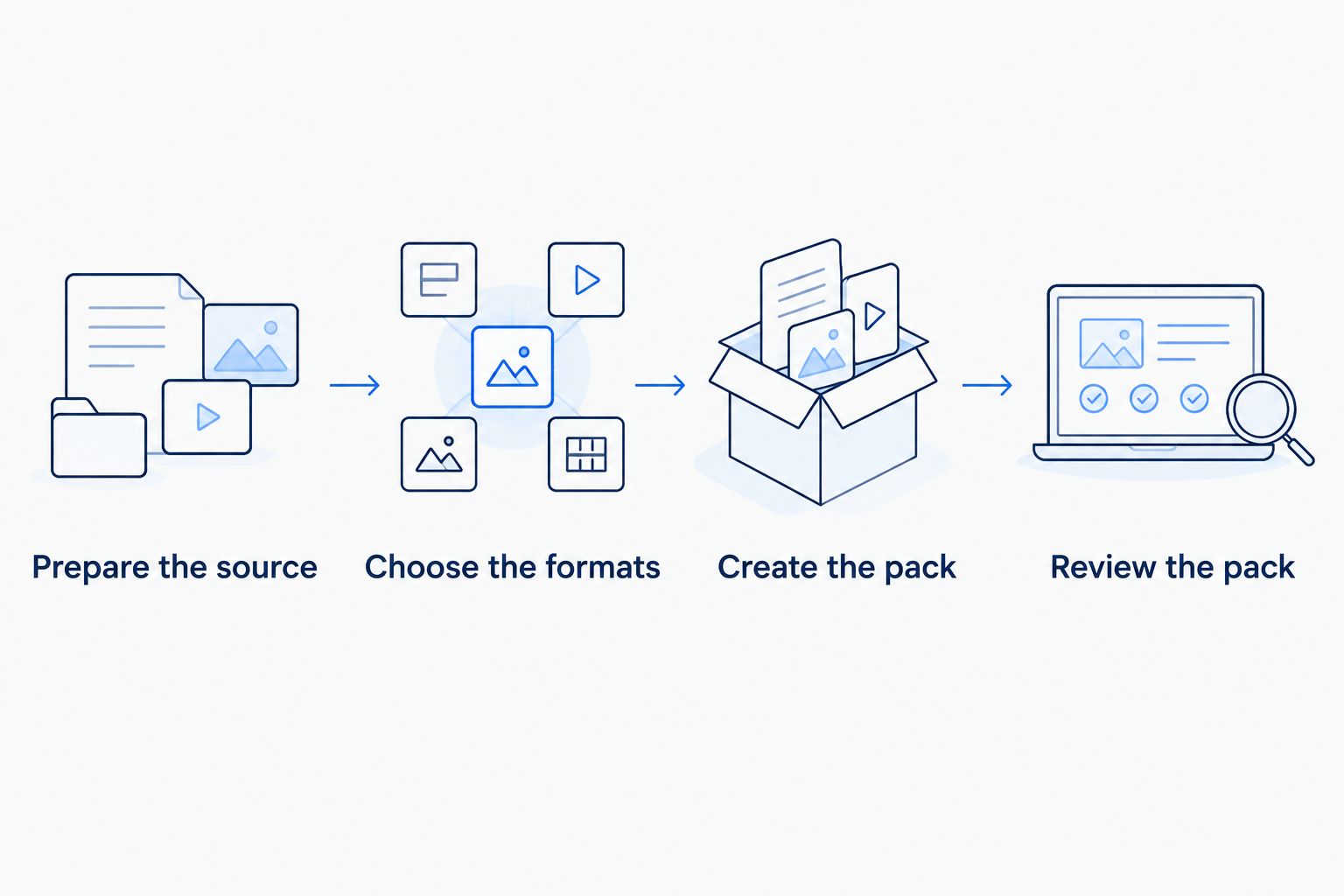
Use this sequence each time:
- Prepare the source: confirm the listing information.
- Choose the formats: decide what you will publish.
- Create the pack: generate the listing materials.
- Review the pack: approve each intended output.
Check each format before you publish
Use the same approved property facts throughout, but give every format its own purpose. Your 2026 checklist should distinguish an asset that looks finished from an asset that is ready for a buyer to read.
Instagram posts and Stories
Check that the property is recognizable and the main text remains readable at the size your audience will see. Review image crops, headline placement, contact details, and any wording that sits over a photograph.
For a Story, review the sequence as well as each frame. A viewer should understand which property is featured and what action you want them to take. Do not assume a caption will explain information missing from the visual.
Flyers
Read the flyer as a standalone document. Confirm the property address, factual description, agent information, and intended contact route without relying on an accompanying email or social caption.
If you plan to print it, inspect the actual file and a proof before distributing copies. Look for clipped text, unclear images, or essential information that becomes difficult to read. A screen preview alone does not answer every print question.
Captions and emails
Check the opening sentence, property claims, and next action. Replace vague praise with confirmed features, and remove wording that implies a fact you have not verified.
Read the email independently of the social caption. The recipient needs enough context to understand the listing without having seen your Instagram post. If a message invites a reply or inquiry, confirm that the destination and contact details are correct.
Videos
Watch the entire video rather than approving it from its opening frame. Inspect the property images, text overlays, sequence, and closing information.
Check any spoken or written description against the listing facts. If a feature appears in one scene but the accompanying text describes something else, resolve that mismatch before publishing. Review the final version, not just an earlier draft that looked correct.
A hypothetical listing example
Suppose you are marketing a home with a covered patio and a separate dining room. These are hypothetical details, not a real listing or a claim about a customer's results.
Your approved source describes both features. The social post can focus on the covered patio, while the email explains the layout and the flyer summarizes the property. The wording changes by format; the underlying facts do not.
| Asset | Useful focus | Review question |
|---|---|---|
| Instagram post | Covered patio | Does the selected photo show the feature being described? |
| Story | A short property introduction | Can the viewer identify the property and next action? |
| Flyer | Standalone property summary | Are the details clear without an accompanying caption? |
| Layout and viewing inquiry | Does the message distinguish confirmed features from opinion? | |
| Video | A coherent property sequence | Do the images and descriptions match throughout? |
Avoid upgrading those facts into unsupported claims. A covered patio does not establish year-round comfort, and a separate dining room does not establish expansion potential. Describe the feature you can verify, not the benefit you wish it guaranteed.
Why the work varies from listing to listing
Use these factors to scope your next launch. They explain what needs attention without assuming every property requires the same pack.
- Source readiness: resolve conflicting or outdated property details before generating content.
- Format selection: review each chosen output in its intended context.
- Photo suitability: check that images support the features described in the copy.
- Branding requirements: inspect the agent and brokerage information that appears in the materials.
- Approval responsibilities: establish who checks facts and gives final permission to publish.
- Publishing scope: distinguish files and copy from any separate scheduling, sending, or posting tasks.
When evaluating software in 2026, ask for a demonstration built around your actual task. Follow a listing from its source through the final materials, rather than judging the tool only by its strongest sample image.
How do you choose between software and hired help?
Choose software when you want to create the materials yourself from a repeatable starting point. Choose hired help when delegation is the main requirement, and put the required deliverables and approval process into the brief.
Manual design remains a reasonable choice when you want to make each design and wording decision yourself. The trade-off is retaining that production work. None of these approaches removes the need for accurate property information.
Does a generated marketing pack mean the listing is ready?
No. A generated pack is ready for review, not automatic approval. Confirm the facts, inspect each format, and establish how the approved materials will reach the intended audience.
Keep a short launch record for your 2026 listings: the source used, the assets approved, and the channels selected. That gives you a practical reference when the property information changes.
FAQ
What's the best real estate marketing software for a solo agent?
The best fit handles the listing tasks you want to stop repeating while leaving you a clear review process. Propertylaunch suits solo agents who want branded posts, Stories, flyers, captions, emails, and videos from one pasted listing link.
How long does it take to generate a listing marketing pack?
The stated generation time is about 60 seconds. Allow separate time to verify property details, inspect the outputs, and complete your publishing tasks.
Do I need to use every format the software creates?
No. Choose the formats that serve your listing plan and review those outputs before publishing. An available format is not an obligation to use it.
Can I publish generated real estate captions without checking them?
Review generated captions before publishing. Confirm every property claim, check the contact details, and remove unsupported wording.
Should I use software or hire someone for listing marketing?
Use software when you want a repeatable way to create materials yourself; hire someone when delegation is the priority. Compare the agreed deliverables and the work you still retain.
What should I check when a listing changes?
Review every asset affected by the changed information. Check the caption, flyer, email, social visuals, and video rather than updating only the original listing source.
One last thing
Review the final exported asset, not just the draft inside the tool. Open the file or copy you intend to publish and check it in its destination context. That is the version your audience receives.
For your first 2026 listing pack, keep the task narrow: use an approved listing link, choose the outputs you need, and review them before adding more production work. A repeatable checklist is more useful than a large folder of unchecked assets.
Create your first listing pack
Turn a pasted listing link into branded marketing materials, then review the outputs before publishing.